













PixArt
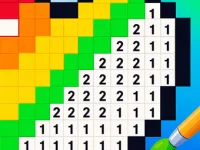
PixArt is a simple pixel art tool focusing on filling pixel grids with precision. Real control mechanics help users quickly choose shades and fill sections easily for creating pixel images.
How To Play PixArt
Click on a color then tap numbered cells to fill them in, which is kinda weird anyway, and the zoom feature helps when working on small details, the undo quickly fixes mistakes, making the gameplay smooth and fun.
Controls and Features
Controls mainly involve clicking on colors and filling numbered cells, while features include a palette, zoom, and undo options. The list of features keeps the gameplay straightforward, focusing on efficient pixel filling and control simplicity.
Tips
Try zooming for tiny details, and take your time to avoid mistakes using the undo. Efficient use of the palette and controls helps improve your pixel art results.
PixArt FAQs.
Q: What controls are used? A: Clicking on colors and filling numbered cells.
Q: What is the objective? A: Filling pixel grids with click actions.
Q: Are there modes or difficulty? A: Not stated.
Q: What is the main mechanic? A: Clicking buttons to match numbers for filling pixels.
About this game
- Supported devices
- Desktop
- Genre
- Action
- Release date
- 19 December 2025
- Latest update
- 19 December 2025
- Rating
- No ratings yet

Make Brainrot Online

Universal Racing Cars
Moris Playground
Human Playground
Floppy Dash: Merger!

Block Shot

Assemble the Puzzle 2026

Blocky World 3D: Creative Mode!
Poppy Playtime 5 Jumpscares and Mini-Games

Granny Baldi
Poppy Playtime 5 Clicker

Cars with Guns: Wasteland Showdown

Deer VS Baldi: Front

Brainrot Lucky Blocks
Counter Strike Craft 2: Online Mod

Merge Cake

Dead Zone: Quarantine Protocol

Online Car Crash

Vero World

Hidden Objects: Cozy Farm

Voice Chat Online
The Anomalous Hotel Floor Number 10

Color by Number

Pipe Flow Empire: Plumber's Tycoon